Download Cart
Instantly copying your files to your Pocket PC |
 |
|
About Download Cart

|
This is not a shopping cart. If you want to shop for licences, neoprene belts, etc., go to
Run.GPS Shop
.
The download cart
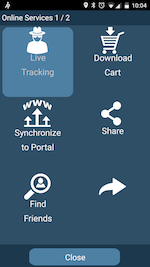
has the sole purpose of making the transferral of items such as routes to your PDA easier for you. Instead of manually copying files around, you just push "Download" in Run.GPS Trainer
(requires Run.GPS 1.2.7 or later).
|
Getting Connected
In order to upload and download items to/from GPS-Sport portal, you need some sort of Internet connection on your PDA. Depending on what kind of Pocket PC you have, there are up to three ways to get this done:
WLAN: Connect to your home WLAN or to a Hotspot.
Cellular Network Data Service: If your Pocket PC has phone capabilities, you can connect using GPRS or UMTS data services. This might be expensive depending on your contract.
|

|
USB + ActiveSync: Use your PC's Internet connection provided it has one.
|